


Split your direct deposit into a checking, savings, and investment account, put every fixed bill on autopay, and keep a $400 to $500 buffer in checking to absorb timing gaps. That single setup, done in one afternoon, replaces months of manual transfers with a system that runs itself. Check it for 15 minutes a month, and it keeps working.
TL;DR:
- Automating paycheck splitting into multiple accounts creates a clear separation between spending, saving, and investment funds, reducing impulsive spending.
- Scheduling transfers to savings and investments one to two days after payday prevents overdrafts caused by timing gaps and ensures timely contributions.
- Prioritizing employer retirement match contributions before other savings maximizes free money and builds a solid financial foundation.
- Regular, 15-minute monthly checks help verify transfers, buffer levels, and subscription charges, maintaining automation effectiveness over time.
- Using percentage-based transfers and spreading bill autopay dates across the month minimizes the risk of overdrafts and missed payments.
Table of Contents
- How to Automate Finances: A One-Afternoon Setup Checklist
- Pay-Yourself-First Rules for Deciding How Much Goes Where
- How to Automate Finances With an Irregular Paycheck
- Which Account Features Actually Make Automation Work
- Automation Mistakes That Cause Overdrafts and Interest Charges
- The 15-Minute Monthly Check That Keeps Automation Working
- Why This Automation System Holds Up
- When Automation Isn’t Enough
- Get Help Setting Up or Auditing Your Automation
- Sources
How to Automate Finances: A One-Afternoon Setup Checklist
Automating your finances doesn’t require new software or a finance degree. It requires an afternoon, your online banking login, and a specific order of operations. Do the steps out of order and you risk a bounced payment or an overdraft fee eating the interest you just started earning. Do them in sequence and the whole system locks into place in about three hours.
Here’s the build order that avoids the common trap of automating bills before the money to pay them has actually landed.
1. Set up your ghost paycheck or split deposit.
Log into your payroll portal (or your bank if your employer only allows single-account deposit) and split your paycheck across two or three accounts: a checking account for bills and spending, a high-yield savings account for your emergency fund, and, if your employer supports it, a separate line straight into your 401(k) or investment account. This “ghost paycheck” trick means money for savings never touches your spending account long enough to get spent. A split direct-deposit strategy also creates a psychological wall between “bill money” and “guilt-free” spending money, which cuts down on the constant mental math of checking one balance for five different purposes.
2. Schedule your savings and investment transfers.
Set automatic transfers to hit your savings account one to two days after payday, not on payday itself, to give your paycheck time to clear. Pick a consistent date each month for brokerage auto-invest, ideally the same week your other transfers land, so your entire paycheck’s worth of “future you” money moves in one tight window. The set it and forget it approach works because it mimics what employer retirement plans do by default: automatic enrollment raises participation rates dramatically, because removing the decision removes the friction that stops people from saving in the first place.
3. Put every fixed bill on autopay, and set credit cards to pay in full.
Go through your bank’s bill-pay system or each biller’s own portal (mortgage, rent, utilities, streaming, insurance) and turn on autopay for anything with a fixed or predictable amount. For credit cards, this step matters more than any other: most cards default new autopay enrollments to the minimum payment. Change that setting to “full statement balance” the moment you turn it on, or you’ll pay interest on carried balances that quietly erases whatever you’re earning elsewhere. Forbes Advisor’s breakdown of credit card autopay confirms this default is common enough to catch experienced cardholders off guard.
4. Build sinking funds for irregular but predictable costs.
Open separate savings sub-accounts, or use your bank’s built-in savings buckets, for costs that aren’t monthly but are certain: car registration, holiday gifts, an annual insurance premium, a dental cleaning. Automate a small weekly or biweekly transfer into each one so the money is there when the bill arrives instead of derailing your checking account balance.
5. Turn on dividend reinvestment (DRIP) in your brokerage.
If you’re not withdrawing dividends for income, flip on automatic reinvestment in your brokerage settings. This is a one-click toggle in most platforms and it means every dividend buys more shares without you lifting a finger.
A few sequencing details make or break this system:
- Align bill due dates where possible; call billers and ask to shift a due date closer to payday.
- Cluster autopay dates into a narrow window right after income lands, rather than spreading them across the month.
- Confirm each automated transfer actually executed during your first monthly check (more on that later) before you trust the system fully.
Pro Tip: Set your savings transfer to fire on a specific date, not “the day after payday.” Payroll timing shifts around holidays, and a date-based transfer that fires before your paycheck clears is the single most common cause of an early overdraft in a new automation setup.
Pay-Yourself-First Rules for Deciding How Much Goes Where
Automating the mechanics is the easy part. Deciding how much money flows where is where most people get stuck, and it’s why a simple allocation framework matters more than any app.
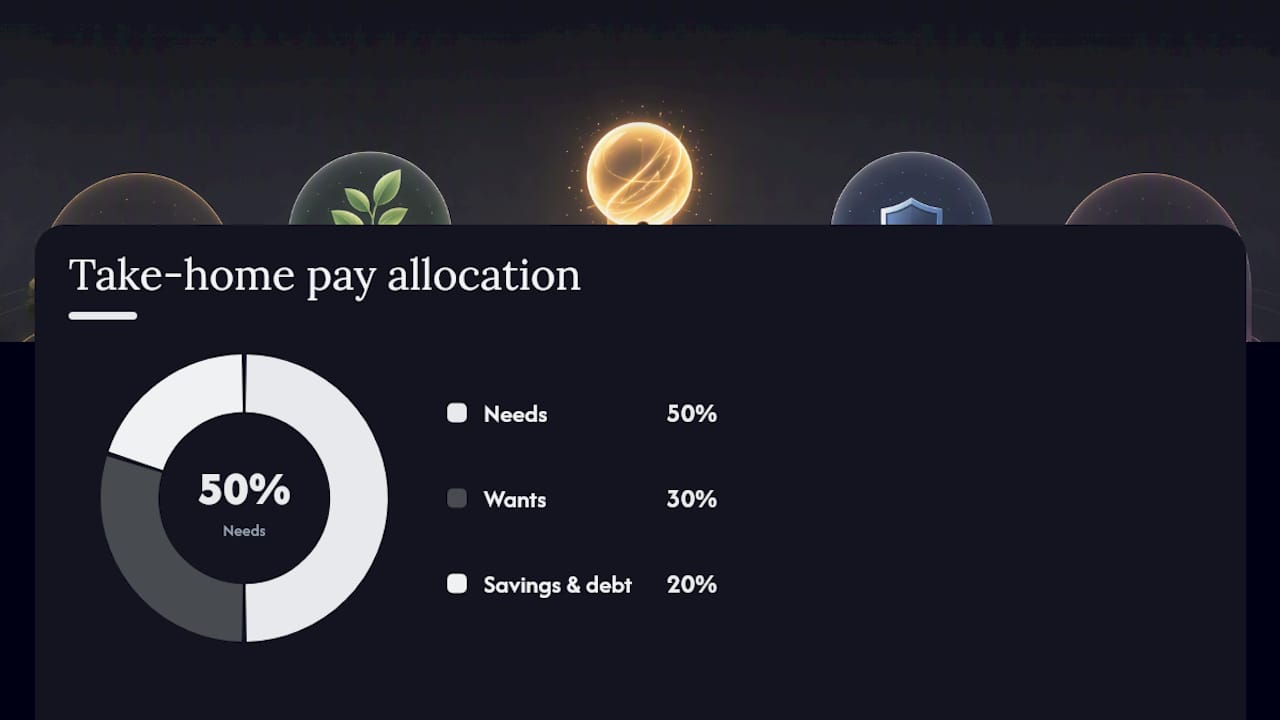
The classic starting point is the 50/30/20 split: 50% of take-home pay to needs, 30% to wants, and 20% to savings and debt paydown. It’s a fine baseline, but it treats “savings” as one bucket when it should be several, each with its own priority.
A better framework is a waterfall, where money flows through priorities in order until each is funded:
- Employer 401(k) match first. This is free money with a guaranteed return; automate contributions up to the full match before anything else.
- Emergency fund second. Build toward three to six months of expenses before aggressively investing beyond the match.
- Retirement accounts third. Once your buffer is solid, increase automated contributions to your 401(k) or IRA.
- High-interest debt fourth. Anything above roughly 7% interest usually beats what you’d earn investing that same dollar.
- Sinking funds fifth. Smaller, targeted automated transfers for known future expenses.
- Discretionary spending last. Whatever’s left is genuinely free to spend without guilt.
For raises, build in a small automatic escalation instead of re-deciding your allocation every year. Increasing your savings rate by 1% at each raise or annual review is small enough not to feel like a pay cut, but it compounds. Someone earning $60,000 might automate $300 a month to the 401(k) match, $500 to an emergency fund until it hits $15,000, then redirect that same $500 into a Roth IRA once the buffer is full. Someone earning $100,000 can typically run a heavier waterfall: match, then $1,000 a month split between retirement and a taxable brokerage, plus $200 into a rotating sinking fund. The exact numbers matter less than the order they get funded in.
How to Automate Finances With an Irregular Paycheck
Freelancers, contractors, and commission-based earners can’t just split a fixed paycheck, but that doesn’t mean automation is off the table. It means automating against your floor, not your average.
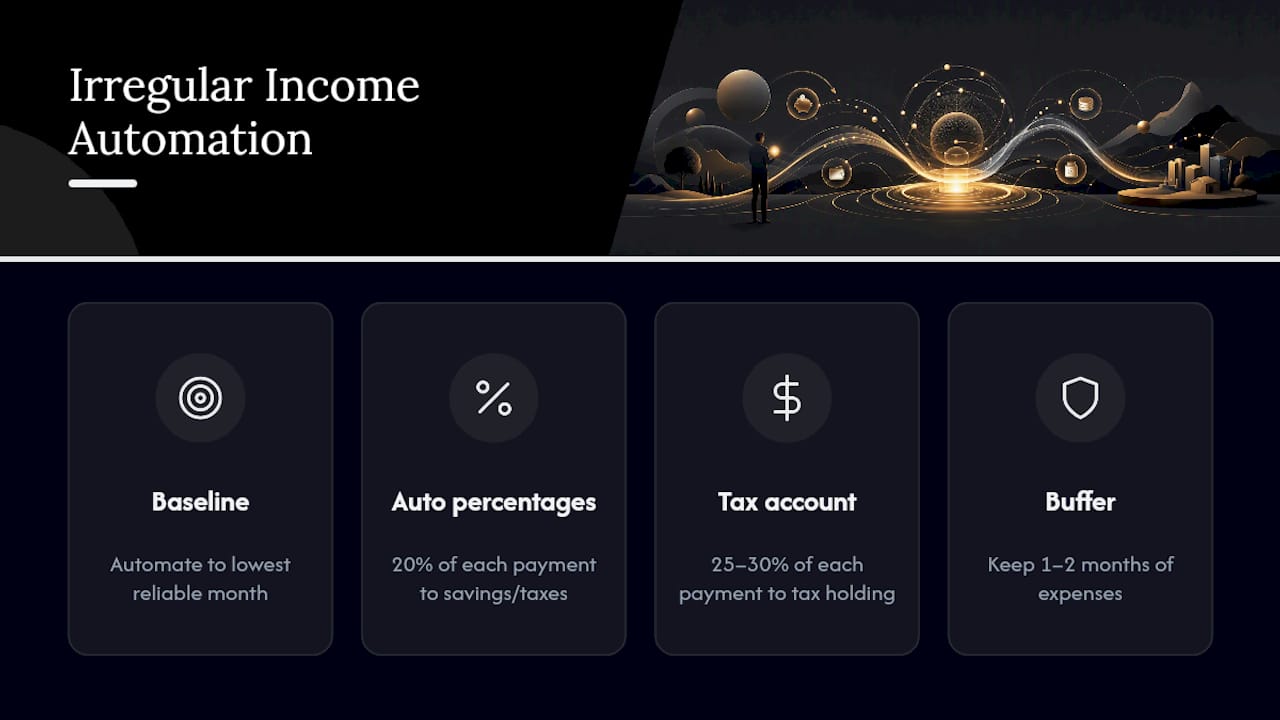
Automate to your lowest reliable month. Look at your past 12 months of income and identify the worst one. Base your fixed automated transfers, rent, insurance, minimum retirement contribution, on that number, not your typical or best month. Anything above the floor becomes a manual or semi-automated top-up.
Use percentage-based transfers instead of flat dollar amounts. Set your bank or accounting software to automatically move a fixed percentage, say 20%, of every incoming payment into savings and taxes the moment it lands. This smooths out the feast-or-famine swings that flat transfers can’t handle.
Keep a bigger buffer than a salaried worker would. Where a steady paycheck might only need the standard $400 to $500 checking cushion, irregular income needs a rolling “rainy day” sub-account, often one to two months of expenses, that absorbs the gap between invoices.
Pro Tip: Open a dedicated tax holding account and automate a transfer of 25 to 30% of every payment into it the day it arrives. It removes the temptation to spend money that’s already earmarked for the IRS, and it makes quarterly estimated payments a matter of clicking “transfer,” not scrambling to find the cash.
Which Account Features Actually Make Automation Work
The tools matter less than the specific settings you enable inside them. Finance automation for individuals is fundamentally about scheduling recurring transfers and payments correctly, a much simpler task than the invoice reconciliation and accounts-payable workflows that businesses automate, so you don’t need enterprise software to get this right.
Here’s what to look for and turn on:
- Split direct deposit or internal transfer rules in your bank, so income divides automatically without you moving a cent by hand.
- Micro-deposit verification when linking external accounts (savings at one bank, checking at another); this confirms ownership and lets transfers move safely between institutions.
- Scheduled recurring transfers with a specific date, not a relative one like “3 days after deposit,” which drifts around holidays and weekends.
- Biller-side autopay rather than only bank-side bill pay when the option exists; it tends to update automatically if a bill amount changes.
- Brokerage auto-invest and DRIP settings, so contributions and reinvested dividends happen without a monthly login.
- Low-balance and large-transaction alerts, set through your bank’s notification settings, so you get a text before a problem becomes an overdraft.
- Subscription detection, either through your bank’s built-in categorization or a dedicated app, to catch recurring charges you forgot you signed up for.
Layering matters here. A useful mental model treats automation as a stack: payroll splits and immediate transfers go in first, then bill autopay, then investment automation, then subscription monitoring on top. Build it in that order and each layer has something stable underneath it. Orchestration tools like Zapier can connect accounts for more complex, multi-step flows, but most people never need anything beyond what their bank and brokerage already offer natively.
Automation Mistakes That Cause Overdrafts and Interest Charges
Automation removes decisions, and removing decisions removes your ability to catch mistakes in real time. That’s the tradeoff, and it’s exactly why a handful of safeguards matter more here than in manual money management.
The five mistakes that cause the most damage:
- Leaving credit card autopay on “minimum payment.” If you carry any balance, interest usually outweighs whatever rewards you’re earning, so change the setting to full statement balance the day you enable it.
- Running checking too close to zero. A $400 to $500 buffer absorbs the normal lag between when money leaves and when deposits clear.
- Scheduling every bill on the same day. Spread autopay dates across a few days instead of stacking five payments on the 1st, which is the fastest way to drain an account before a deposit posts.
- Skipping low-balance alerts. These take two minutes to set up and catch problems before they become fees.
- Never reviewing subscriptions. Automated billing is exactly what lets forgotten $12 charges survive for years unnoticed.
A quarterly subscription review, even a 10 minute scroll through your statement, catches the “zombie subscriptions” that autopay quietly protects from cancellation. Pair that with alerts for any charge above a threshold you set, and the system polices itself between your monthly check.
The 15-Minute Monthly Check That Keeps Automation Working
Automation isn’t “set and never look again.” It’s set and glance occasionally. A short monthly check-in is what separates a system that quietly breaks from one that runs for years.
Monthly, spend 15 minutes on this:
- Confirm each scheduled transfer actually executed and hit the right account.
- Check your checking buffer sits at or above your target.
- Scan for any bill amount that changed since last month.
- Look for new or unfamiliar subscription charges.
Annually, add these to your calendar:
- Rebalance investment allocations back to target.
- Revisit savings goals and adjust transfer amounts.
- Confirm beneficiaries are current on retirement and investment accounts.
- Resize sinking funds for the year’s known expenses.
Put a recurring calendar reminder on the same date each month, right after your transfers clear, and a separate annual reminder near your birthday or the new year. The check takes less time than deciding what to have for lunch.
Why This Automation System Holds Up
The core structure here rests on a straightforward finding: automatic enrollment and scheduled transfers dramatically increase how consistently people actually save, the same mechanism that makes employer retirement auto-enrollment so effective compared to opt-in plans. Automating recurring investment contributions also captures dollar-cost averaging automatically, since the transfer happens regardless of what the market is doing that week.
Finblog’s own guides build on the same framework covered here. The full automation stack breakdown walks through the layered build order in more depth, and the piece on financial wellness routines covers why consistent small check-ins outperform occasional deep audits for long-term habit formation.
A few grounding facts worth keeping in mind:
- Monthly check-ins of roughly 15 minutes catch failed transfers before they compound into missed bills.
- A $400 to $500 checking buffer is a widely cited threshold for absorbing normal timing gaps.
- Automation works best layered, not built all at once in random order.
When Automation Isn’t Enough
Automation handles the repetitive 90% of money management well: bills, savings, investing on schedule. It doesn’t replace judgment during a divorce, a job loss, a windfall, or a year with genuinely complex taxes. Those moments need a real conversation, not a transfer schedule.
I’d treat the system in this article as your default state, not your only tool. Set it up, trust it for months at a time, and step back in only when life changes the underlying numbers. If your situation has gotten complicated enough that you’re second-guessing your own allocation, Finblog’s personal finance management guide is a reasonable next stop before you seek a professional.
— Povilas
Get Help Setting Up or Auditing Your Automation
There are structured guides that walk through the exact sequencing, allocation math, and account settings covered here, to help avoid the weeks of tweaking most people spend getting it wrong the first time. If you’ve already got a system running but suspect a leak, an outdated transfer amount, a forgotten subscription, or an autopay still set to minimum, resources exist to help you audit it against a framework that’s actually built for that purpose.
Sign up through Finblog to get guides and updates sent directly to you, and use the monthly budgeting template to run your first 15-minute check with a structure already built in.
This article is general information, not a substitute for advice from a qualified financial advisor. Consult a qualified financial professional about your own circumstances before acting on anything here.
Sources
- The ‘Set It and Forget It’ money system — SuperMoney
- Monthly money check-in guidance — FWCCU blog
- What is credit card autopay and how does it work? — Forbes Advisor
- Ways to avoid a checking account overdraft — GE Credit Union